
Most ERP implementations don’t fail because of the software — they fail because of the rollout. Teams pick a strong platform, then rush the timeline, skip proper data migration, or throw the whole company into a new system on day one with no pilot phase. The result is months of workarounds, frustrated staff, and a system nobody trusts.
A solid ERP implementation plan fixes this before it starts. It’s not about moving fast — it’s about moving in the right order: defining requirements, cleaning your data before it migrates, testing before anyone depends on the system, and training people in stages instead of all at once.
This guide walks through exactly that: a step-by-step ERP implementation plan covering realistic timelines, what to do differently if your team works remotely, how to protect your data through the migration, and the mistakes that turn a good ERP choice into a rollout nobody wanted.
The ERP Implementation Timeline: What to Expect
Before you sign a contract or set a launch date, you need a realistic picture of what an ERP implementation actually involves. It isn’t a single event — it’s a sequence of phases, each with its own risks, and skipping or rushing any one of them is where most timelines fall apart. Here’s what the process actually looks like, and how long it realistically takes.
The Typical Phases (Discovery, Configuration, Migration, Testing, Go-Live)
Every ERP implementation moves through the same core phases, regardless of vendor or company size. Discovery comes first — mapping current workflows, defining requirements, and deciding which modules you actually need. Next is configuration, where the vendor or implementation partner sets up the system to match your processes rather than forcing you to adapt to theirs. Data migration follows: moving customer records, inventory, financials, and historical data out of spreadsheets and legacy systems into the new platform. Testing comes before anyone relies on the system day-to-day — running real transactions through it to catch errors while mistakes are still cheap to fix. Go-live is the final phase, when the team actually switches over and starts using the system for daily operations.
How Long Does ERP Implementation Actually Take
For a small or mid-sized business, a realistic ERP implementation timeline runs 2 to 6 months. Cloud-based systems with fewer customizations land toward the shorter end; heavily customized or multi-location rollouts stretch toward the longer end. Vendors sometimes quote faster timelines to close the deal — treat anything under 6 weeks for a full implementation with real skepticism, since rushed data migration and skipped testing are exactly what cause post-launch chaos.
Step-by-Step ERP Implementation Plan
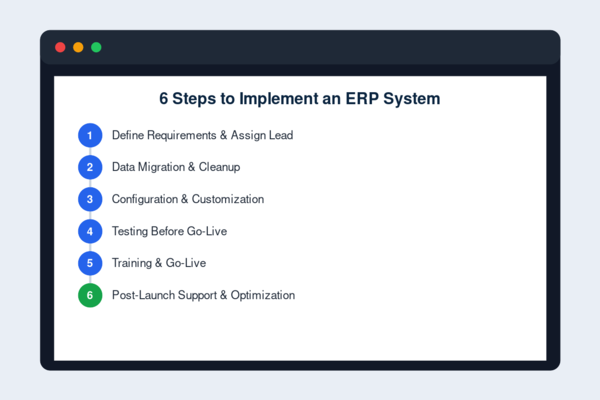
The phases above describe what happens in theory. Here’s what it actually looks like broken into the six concrete steps you’ll work through, in order — skipping ahead on any one of them is usually where implementations start to slip.
Step 1 — Define Requirements & Assign a Project Lead
Before any configuration starts, document exactly which processes the ERP needs to support — inventory, finance, HR, procurement — and who owns each one. Assign a single internal project lead who isn’t also trying to run their normal job at the same time. Implementations without a dedicated owner tend to drift, because no one has the authority or bandwidth to make decisions when the vendor asks a question.
Step 2 — Data Migration & Cleanup
This is the step most teams underestimate. Old spreadsheets and legacy systems are full of duplicate records, outdated pricing, and inconsistent formatting. Migrating that mess as-is just moves the problem into your new system. Clean and de-duplicate data before migration, not after — it’s far cheaper to fix in a spreadsheet than inside a live ERP.
Step 3 — Configuration & Customization
Configuration is where the system gets set up to match your actual workflows — approval chains, user roles, reporting structures. Keep customization minimal at this stage. Every custom field or workflow adds complexity to future upgrades and support, so configure only what you genuinely need for go-live, not every feature you might use someday.
Step 4 — Testing Before Go-Live
Run real transactions through the system before anyone depends on it — a full sales cycle, a payroll run, an inventory adjustment. Testing exists to catch broken workflows while fixing them is still cheap. Skipping this step to save a week almost always costs far more time after launch, dealing with errors in a live system.
Step 5 — Training & Go-Live
Train people in their actual daily workflows, not a generic system overview — a warehouse worker and a finance manager need completely different training. Go-live should happen once a pilot group has used the system successfully, not on the same day everyone gets access for the first time.
Step 6 — Post-Launch Support & Optimization
Implementation doesn’t end at go-live. Budget for a support period where the vendor or internal team is actively fixing issues and refining workflows based on real usage. The first 60-90 days after launch reveal problems that testing never catches, so this stage matters as much as the setup itself.
Implementation Tips That Actually Save Time and Money
Beyond following the six steps in order, a few practical habits separate smooth rollouts from painful ones. These aren’t complicated, but they’re the details most teams skip under deadline pressure — and skipping them is usually what turns a manageable implementation into an expensive one.
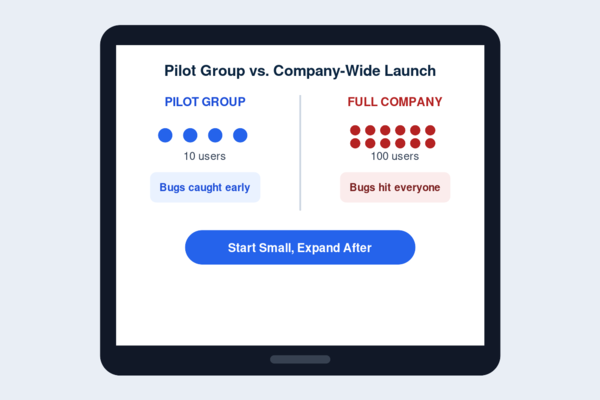
Start With a Pilot Group, Not the Whole Company
Roll the system out to one department or a small team first, let them work through real issues, then expand once the workflow is proven. Rolling out to everyone simultaneously means any bug or workflow gap hits your entire company at once — instead of surfacing with a small test group where it’s cheap to fix before it reaches the rest of the team.
Avoid Over-Customizing Out of the Gate
It’s tempting to configure every feature and custom workflow before launch. Resist it. Start with the standard configuration for your core processes, go live, and add customization later based on what your team actually needs — not what seems useful in a planning meeting before anyone’s used the system.
Assign an Internal Champion, Not Just an IT Contact
The IT contact manages the technical setup; the champion is someone respected by the actual users who can answer “why are we doing it this way” questions and build buy-in. Implementations stall when the only support is technical — people need someone on their side, not just someone who can reset a password.
Implementing ERP for Remote and Distributed Teams
A remote or hybrid workforce adds a layer most standard implementation plans don’t account for. Access, training, and coordination all need extra thought when your team isn’t sitting in the same building — and skipping that thought is where remote rollouts tend to break down.
Cloud Access & Role-Based Permissions
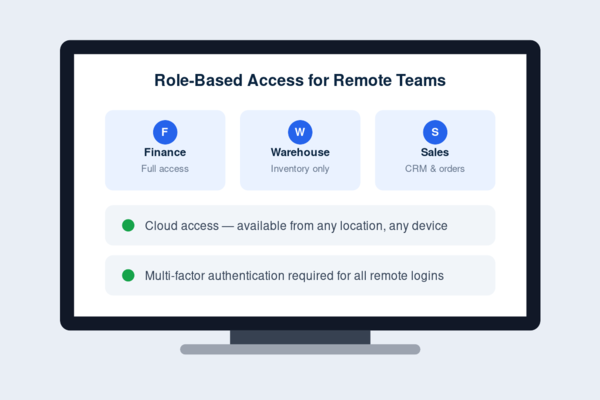
A cloud-based ERP is close to non-negotiable for distributed teams — on-premise systems tied to a single office network create constant access friction. Set up role-based permissions from day one, so remote employees see exactly the modules and data relevant to their job, no more and no less, without IT fielding individual access requests every week.
Remote Training & Onboarding Challenges
Training a distributed team means you lose the ability to walk over and show someone directly. Record short, role-specific video walkthroughs instead of relying on one live session, and build in a way for remote employees to ask questions asynchronously. Live-only training sessions consistently leave time-zone-disadvantaged employees undertrained.
Keeping Teams Aligned Across Time Zones
Configuration decisions and go-live timing need input from every location, not just headquarters. Schedule key implementation checkpoints at times that rotate across time zones so no team is permanently stuck attending at 6am, and document decisions in writing so no one’s left catching up after the fact.
ERP Data Security During and After Implementation
An ERP system holds your most sensitive business data in one place — financials, customer records, payroll — which makes security a core part of the implementation, not a checkbox added afterward. The risks look different at each stage, from migration to daily use.
Data Migration Security Risks
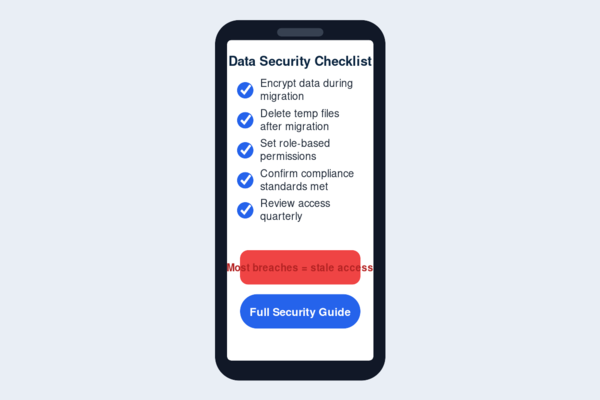
Moving data between systems is one of the most vulnerable points in the whole process. Files often pass through temporary storage, spreadsheets, or third-party migration tools before landing in the new ERP, and each handoff is a potential exposure point. Encrypt data in transit, limit who has access to migration files, and delete temporary copies once migration is verified complete.
Access Controls & Compliance
Set permissions by role, not by convenience — finance data shouldn’t be visible to someone who only needs inventory access. For businesses handling customer payment data or regulated information, confirm the ERP meets relevant compliance standards before go-live, not after an audit flags the gap.
Ongoing Security Best Practices Post-Launch
Security doesn’t end at launch. Review user access permissions quarterly as roles change, keep the system patched with vendor updates, and require multi-factor authentication for any remote or admin-level access. Most ERP breaches trace back to stale permissions or unpatched systems, not sophisticated attacks.
Common Implementation Mistakes to Avoid
Most ERP implementation failures come down to a handful of repeated mistakes rather than bad software. Rushing the timeline to hit an arbitrary launch date leads to skipped testing and untrained staff. Migrating dirty data without cleanup first just moves old problems into a new system. Over-customizing before anyone’s used the platform adds cost and complexity that rarely gets used. Launching company-wide instead of starting with a pilot group means every bug hits everyone at once. And treating go-live as the finish line — rather than budgeting real time for post-launch support — leaves teams stuck with unresolved issues nobody’s actively fixing. Avoiding these isn’t complicated; it just requires resisting pressure to move faster than the process allows.
FAQs
How long does ERP implementation take?
Most small and mid-sized businesses complete ERP implementation in 2 to 6 months, depending on customization needs and company size. Cloud-based systems with minimal customization land toward the shorter end; multi-location or heavily customized rollouts take longer. Be skeptical of any vendor quoting a full implementation in under 6 weeks.
Who should lead an ERP implementation?
A dedicated internal project lead, supported by an internal champion who has credibility with actual users — not just an IT contact. Implementations without a clear owner tend to stall, since no one has the authority to make timely decisions when questions come up.
Can ERP be implemented remotely?
Yes, with a cloud-based system, role-based permissions, and recorded training instead of live-only sessions. Remote implementations need extra attention to time-zone coordination and asynchronous documentation, but the process itself works well for distributed teams when planned for from the start.
Closing
Implementing an ERP system successfully isn’t about moving fast — it’s about following the sequence: define requirements, migrate clean data, configure only what you need, test before anyone depends on it, train in stages, and keep supporting the system after launch. Skip a step to save a week, and you’ll likely lose a month fixing what broke. Whether your team is in one office or spread across time zones, the businesses that get real value from ERP are the ones that treated implementation as a process, not an event.