If you’re running a small business and juggling a separate spreadsheet for inventory, another tool for invoicing, a different app for customer records, and a sticky note system for reordering supplies, you’ve probably felt the chaos of disconnected data. That’s usually the moment business owners start hearing the term “ERP” thrown around — and immediately assume it’s something only for giant corporations with IT departments.
It isn’t. ERP for small business has become increasingly accessible, affordable, and — more importantly — genuinely useful for companies with a handful of employees, not just enterprises with thousands. This guide breaks down what ERP actually is, what it does, and how to tell whether your business is at the point where you need one, without the enterprise-software jargon that makes most explanations harder to understand than they need to be.
What Is ERP? (In Plain English)
ERP Meaning, Simply Explained
ERP stands for Enterprise Resource Planning, but the name is more intimidating than the concept. At its core, an ERP system is a single piece of software that connects the different functions of your business — accounting, inventory, sales, customer records, and sometimes HR — so they all pull from the same shared data instead of living in separate, disconnected tools.
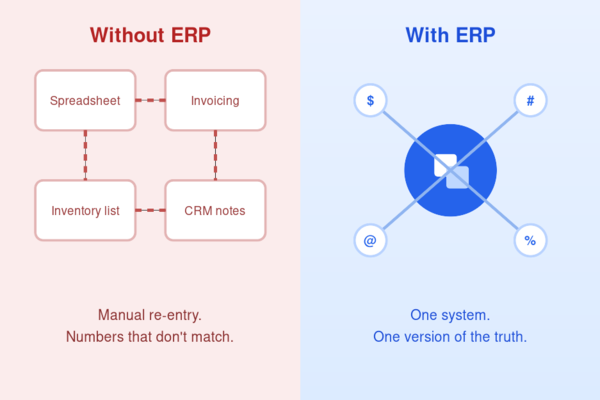
Instead of updating your inventory count in one spreadsheet, then manually re-entering that same number into an invoicing tool, and again into a sales report, an ERP system keeps one version of the truth. When a sale happens, inventory updates automatically. When inventory changes, your financial reports reflect it. Everything talks to everything else.
How ERP Differs from Regular Business Software
Most small businesses don’t start with ERP — they start with a patchwork of single-purpose tools: an accounting app, a separate CRM, a spreadsheet for stock levels. Each of those tools does one job well, but none of them know what the others are doing.
ERP software is different because it isn’t a single-purpose tool — it’s a shared system that multiple departments plug into. This distinction becomes more important as a business scales. The real expense of running disconnected software isn’t the monthly subscription cost — it’s the accumulated staff hours spent cross-checking numbers between systems that were never built to communicate with each other in the first place.
Core Modules of an ERP System
Not every ERP system includes every module below, and part of choosing the right one is figuring out which of these your business actually needs.
Finance & Accounting
Most ERP platforms build this module as their foundation, covering the general ledger, accounts payable and receivable, invoicing, and financial reporting functions. Instead of your bookkeeping software operating in isolation, it’s directly tied to sales and inventory activity as it happens.
Inventory & Supply Chain
For businesses that sell physical products, this module tracks stock levels, reorder points, supplier information, and purchase orders in real time — eliminating the classic small-business problem of selling something you don’t actually have in stock anymore.
CRM & Sales
Many ERP systems include a built-in customer relationship management layer, tracking leads, orders, and customer history alongside the rest of your operational data, rather than as a disconnected app your sales team uses independently.
HR & Payroll
Larger ERP suites extend into employee records, payroll processing, and time tracking — useful once you have enough staff that manual HR administration starts eating real hours out of your week.
ERP vs. MRP vs. Manufacturing Software
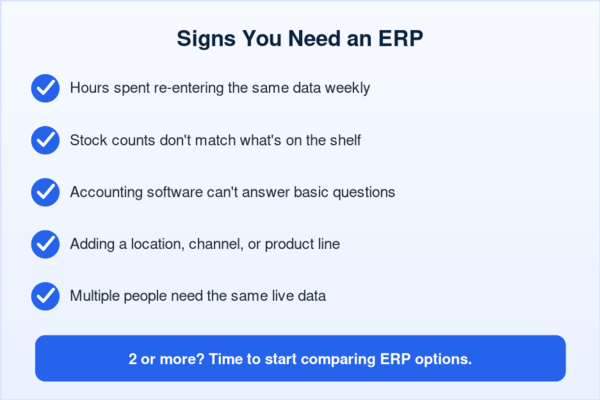
If you’ve been researching business software, you’ve likely run into two other acronyms that get confused with ERP constantly: MRP (Material Requirements Planning) and standalone manufacturing software.
MRP is actually a subset of what ERP covers — it specifically handles production planning, raw material needs, and manufacturing schedules. Many modern ERP systems include MRP as one module within a larger platform, rather than as a separate product.
Standalone manufacturing software, meanwhile, is usually built specifically for production-floor operations — scheduling machines, tracking work orders, managing shop-floor data — without necessarily covering finance, sales, or company-wide reporting the way a full ERP does.
The practical difference: if your only pain point is production scheduling, manufacturing-specific software alone might solve it. If your pain point is disconnected data across your entire business — finance, inventory, sales, and production all disagreeing with each other — that’s when full ERP becomes the more sensible investment.
Key Benefits of ERP for Small Businesses
Centralized Data & Fewer Spreadsheets
The most immediate benefit small business owners notice after adopting ERP is simply not having to maintain the same numbers in five different places. Before ERP, a typical week might involve updating a sales figure in one spreadsheet, copying it into an inventory tracker, then re-entering it again in a separate accounting tool — with every manual transfer being a fresh opportunity for a typo or a missed update. With ERP for small business operations, there’s one system and one set of numbers, which means far fewer reconciliation headaches at month-end and far less time spent double-checking whether two tools actually agree with each other.
Real-Time Reporting for Better Decisions
Instead of waiting until your bookkeeper compiles last month’s numbers, ERP systems typically show live dashboards — current cash position, current stock levels, current sales performance — so decisions get made on what’s actually happening right now, not on data that’s already a few weeks stale. For a small business owner deciding whether to reorder stock, hire another employee, or take on a large new order, the difference between a two-week-old snapshot and a live number can genuinely change the decision.
Scalability as You Grow
A spreadsheet-based system that works fine for 5 employees usually starts breaking down somewhere around 15-20, simply from the sheer volume of manual updates required to keep everything accurate. ERP systems are built to scale with you — adding users, adding a second location, or adding a new product line — without needing to rebuild your entire back-office process from scratch every time the business grows a little.
Signs Your Small Business Actually Needs an ERP
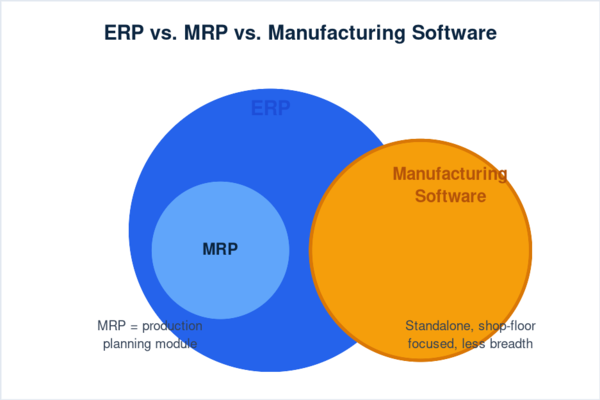
Not every small business needs one right away — jumping in too early just means paying for complexity you don’t need yet. A few clear signals it’s time to look seriously:
- Your team spends real hours each week re-entering the same data across separate tools
- Stock counts in your system rarely match what’s actually on the shelf
- Your accounting software can’t answer basic business questions without manual exports
- You’re adding a location, channel, or product line your current setup can’t handle
- Several people need the same live data and don’t have it
Two or more of these showing up is a solid sign it’s time to start comparing options.
Common ERP Myths for Small Businesses
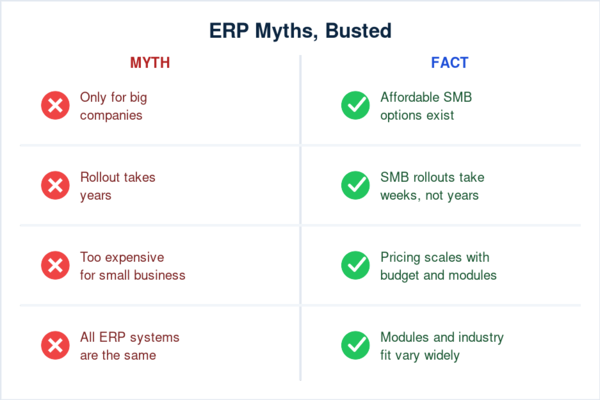
“ERP is only for big companies.” This was largely true a decade ago, when ERP effectively meant six-figure enterprise contracts and dedicated IT teams to manage the rollout. Cloud-based ERP has since changed that landscape considerably, making small-business-focused, subscription-priced options widely available and far more accessible than the enterprise systems the term originally described.
“ERP rollout takes forever.” It’s true that large-scale corporate deployments can drag on for a long time given how much data and how many departments are involved. Small-business implementations look nothing like that, though — with modern cloud-based platforms built for faster onboarding, most are done in a matter of weeks rather than years.
“It’s too expensive for a small business.” Pricing varies enormously depending on the vendor and which modules you actually select, and cost is a genuinely real factor worth weighing carefully before committing. But it’s no longer an automatic disqualifier the way it once was — plenty of ERP for small business options now exist at price points built specifically for smaller budgets rather than enterprise ones.
“Every ERP system is pretty much interchangeable.” That’s rarely true in practice — platforms differ a lot in which modules they lead with, how difficult they are to learn, and which industries they’re actually designed around. An ERP built with manufacturers in mind ends up looking quite different from one aimed at service-based companies.
FAQs
What is ERP in simple terms?
ERP is software that connects the different parts of running a business — finance, inventory, sales, and sometimes HR — into one shared system instead of several separate, disconnected tools that don’t talk to each other.
Do small businesses really need ERP?
Not always, and not immediately. It becomes genuinely worth considering once manual data entry across multiple tools starts costing real time each week, or your business has clearly outgrown what spreadsheets and single-purpose software can reasonably handle.
How does ERP differ from standard accounting software?
Accounting software handles your books — invoicing, ledgers, and financial reporting. ERP includes accounting but extends further into inventory, sales, and day-to-day operations, connecting departments rather than functioning as a single standalone tool.
Is ERP the same as CRM?
No. A CRM specifically manages customer and sales relationships — leads, deals, and customer history. Many ERP systems include a CRM module as one piece of the larger platform, but a standalone CRM alone doesn’t cover finance, inventory, or operations the way a full ERP system does.
When can a small business expect to see ROI after adopting ERP?
This varies by business and by how disorganized the “before” state was, but small businesses often start seeing measurable time savings within the first few months, even before the full financial ROI becomes clear in reporting.
Understanding what ERP is is only the first step — the harder question is which system actually fits your business and budget. In the next guide, we compare the leading ERP platforms built specifically for small businesses, and after that, we break down exactly what ERP implementation costs and the ROI you can realistically expect.