Every ERP vendor’s pricing page tells a version of the same story: a clean starting number, a few tiers, and a “contact us for custom pricing” link that hides more than it reveals. The truth is, ERP pricing rarely matches what businesses actually end up paying once implementation, training, and add-on modules enter the picture.
That gap between the advertised price and the real cost is where most ERP budgets go sideways — not because vendors are being deceptive, but because pricing structures vary so much between platforms that comparing them apples-to-apples takes more digging than a pricing page alone provides.
This guide unpacks what ERP systems really cost, the specific factors that push implementation budgets higher or lower, where the more affordable options fall, and a practical way to calculate whether the investment pays off for your business — grounded in actual pricing data, not vendor sales pitches.
How ERP Pricing Works
Understanding ERP pricing starts with recognizing that vendors don’t all charge for the same things — two platforms with similar sticker prices can end up costing very different amounts once you factor in how each one actually structures its fees.
Per-User vs. Per-Module Pricing
Most ERP pricing follows one of two models. Per-user pricing charges a monthly or annual fee for each employee who needs system access, which scales predictably as your team grows but can add up quickly for larger staffs. Per-module pricing instead charges based on which functional pieces you use — finance, inventory, CRM, HR — letting smaller businesses pay only for what they need, though costs can climb fast if you end up adding modules one by one as needs expand. Neither model is inherently cheaper; it depends on whether your business has more employees than functional needs, or the reverse.
Subscription vs. One-Time License
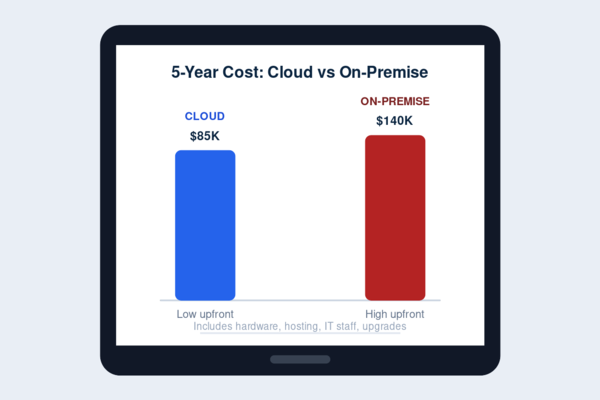
The second major factor in ERP pricing is whether you’re paying an ongoing subscription or a one-time license fee. Cloud-based ERP systems are almost universally subscription-based now, spreading cost out monthly or annually in exchange for automatic updates, hosting, and maintenance handled by the vendor. Older on-premises systems more commonly used one-time licensing, which meant a larger upfront cost but no recurring fee — though businesses were then responsible for their own hosting, updates, and infrastructure. Subscription pricing has become the default for a reason: it lowers the barrier to entry and shifts maintenance responsibility to the vendor, but it’s worth calculating the multi-year total rather than just the monthly number when comparing it against a one-time license option.
What Affects ERP Implementation Cost
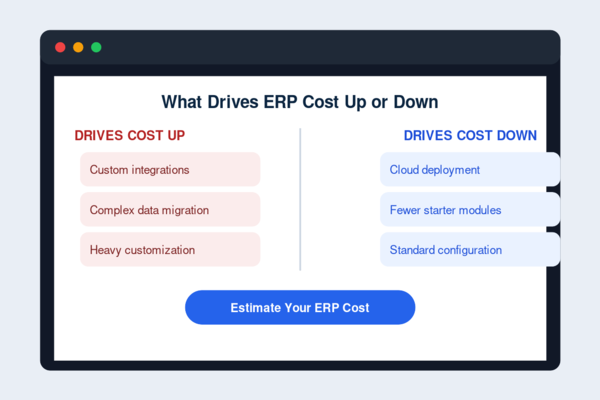
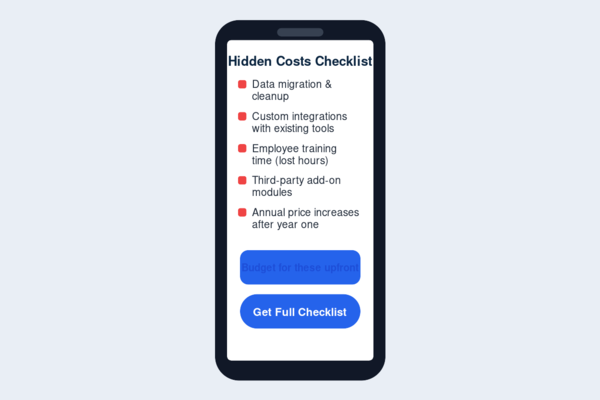
The subscription or license fee is only part of the actual number. ERP pricing conversations often focus on the software cost alone, but implementation is where budgets frequently run over — and it’s rarely reflected on a vendor’s pricing page at all.
Customization & Data Migration
Every business’s existing data — financial records, inventory history, customer information — has to move into the new system somehow, and how clean that data is going in determines how much migration work is required. Heavily customized workflows add further cost, since configuring an ERP system to match specific processes takes more development time than accepting the platform’s default setup. Businesses that adapt their processes to fit the software, rather than demanding the software bend to every existing process, generally see lower implementation costs as a result.
Training & Support
Even a well-implemented ERP system fails to deliver value if staff don’t know how to use it, which is why training is a real line item rather than an afterthought. Some vendors include a baseline of training in their ERP pricing, while others charge separately for onboarding sessions, documentation, or a dedicated support tier. It’s worth clarifying upfront exactly what’s included versus billed separately, since ongoing support costs after the initial rollout can meaningfully change the total cost of ownership over the following years — often more than the difference between two vendors’ base subscription prices.
Budget-Friendly ERP Options
Not every business needs the most expansive ERP system on the market, and ERP pricing at the budget-friendly end has genuinely improved as more cloud-based, modular platforms have entered the space.
Open-Source & Modular Platforms
These offer the lowest entry point, since you can start with just the core modules — accounting, inventory — and add functionality later rather than paying for a full enterprise suite upfront. This keeps initial ERP pricing low while still leaving room to scale.
Startup & SMB-Tier Vendor Plans
Many enterprise-grade ERP providers now offer scaled-down tiers specifically priced for smaller teams, trading some advanced functionality for a meaningfully lower monthly cost — often a reasonable trade-off for businesses that don’t need the full feature set yet.
Ways to Keep Costs Down
No matter which platform you choose, a few tactics consistently save money: push back on the vendor’s default implementation scope instead of accepting it as-is, launch with a minimal set of modules and add more only once the core system is proven, and lean toward cloud deployment rather than on-premise to sidestep heavy upfront infrastructure spend.
Going cheap doesn’t guarantee good value, but for companies that can’t take on a full enterprise-scale rollout, these strategies bring ERP pricing down to a manageable level without giving up the core payoff of having everything running on one unified system.
How to Calculate ERP ROI
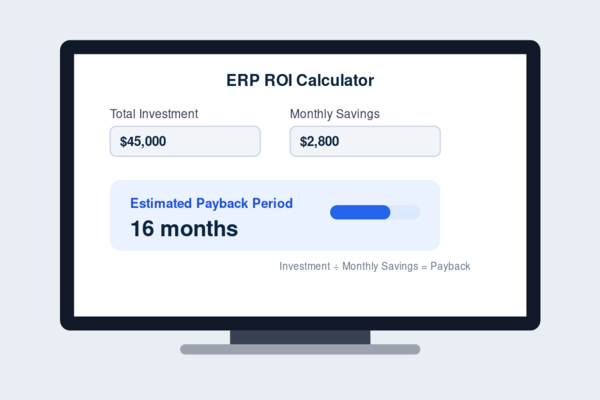
Return on investment only means something when you can compare it against what you actually paid — which is why understanding ERP pricing first matters before trying to calculate whether the system was worth it.
Time Savings
The most immediate and measurable ROI usually comes from hours no longer spent on manual data entry and reconciliation. Track how many hours per week your team spent moving data between disconnected systems before implementation, then compare that against the reduced time after — multiplied by hourly labor cost, this is often the fastest way to see a concrete number.
Error Reduction
Manual processes introduce mistakes: mismatched inventory counts, duplicate data entry, invoicing errors. Each of these carries a real cost, whether it’s a missed sale from overselling stock or staff time spent tracking down a discrepancy. Estimating the frequency and cost of these errors before and after implementation gives a second concrete data point for ROI, even though it’s less visible than time savings on a spreadsheet.
Revenue & Efficiency Gains
The harder-to-quantify but often larger return comes from better decision-making enabled by real-time data — catching a cash flow issue earlier, identifying a slow-moving product line faster, or responding to demand changes before they become a problem. These gains don’t show up as a clean line item the way time savings do, but they compound over time and are frequently what separates a system that merely paid for itself from one that meaningfully accelerated growth.
Weighed together, these three factors give a realistic picture of whether the ERP pricing you’re paying is delivering a return — rather than relying on a vendor’s promised ROI figures alone.
ERP ROI Case Studies
Real-world ROI patterns tend to repeat across industries, even though the specific numbers vary.
Case Study: A Service-Based Business
A 40-person consulting firm implemented ERP primarily to unify project billing and resource tracking, which had previously lived in separate tools that didn’t talk to each other. Within the first year, the firm reported roughly 8 hours per week in administrative time saved across the team, along with fewer billing errors that had previously caused client disputes and delayed payments.
Case Study: A Manufacturing Business
A small manufacturer adopted ERP mainly for production planning and inventory accuracy, two areas where manual tracking had caused frequent stockouts and overproduction. After implementation, inventory accuracy improved substantially, and the business was able to reduce excess raw material purchasing — a direct cost saving that showed up within the first two quarters.
What These Cases Have in Common
Neither business saw ROI as a single dramatic event. Both saw it accumulate through fewer errors, less manual work, and faster access to accurate data — the same categories outlined in the ROI framework above. That pattern holds across most small and mid-sized ERP implementations: the return is real, but it shows up gradually rather than immediately, which is worth setting realistic expectations around before implementation begins.
When the Investment Makes Sense
If manual processes are already costing measurable time and money — the kind quantified in the ROI framework above — the investment case is usually straightforward. The math tends to work in ERP’s favor once inefficiency has a real, calculable cost attached to it.
When to Wait
If your business is still small enough that spreadsheets and single-purpose tools are handling the load without real friction, jumping into ERP pricing commitments early can mean paying for capacity you won’t use for a while. There’s no penalty for waiting until the pain points are clear.
Getting Buy-In Internally
The math can check out completely and adoption will still stall if the people using the system day to day aren’t on board. Involving key staff early, and being upfront about the learning curve, tends to matter as much to a successful rollout as the ROI math itself.
FAQs
How much does ERP pricing typically range?
It varies significantly by vendor, user count, and modules selected — from budget-friendly modular platforms to enterprise-tier systems with substantial implementation costs on top. Getting a vendor-specific quote is the only way to know your real number.
What’s included in ERP implementation cost, beyond the software itself?
Data migration, customization, staff training, and ongoing support are the most common additional costs — several of which vendors don’t clearly itemize on their pricing pages upfront.
How long until ERP pays for itself?
This depends on how much manual inefficiency existed beforehand. Time savings often show up within months, while larger revenue or efficiency gains tend to compound over a year or more rather than appearing immediately.
Is there a truly affordable ERP option for smaller budgets?
Yes — open-source and modular platforms, along with scaled-down SMB tiers from larger vendors, have made ERP pricing considerably more accessible than it was even a few years ago.
Does ERP pricing usually include ongoing support?
It varies by vendor — some bundle a baseline support tier into the subscription, while others charge separately for onboarding and continued assistance, so it’s worth confirming before signing.