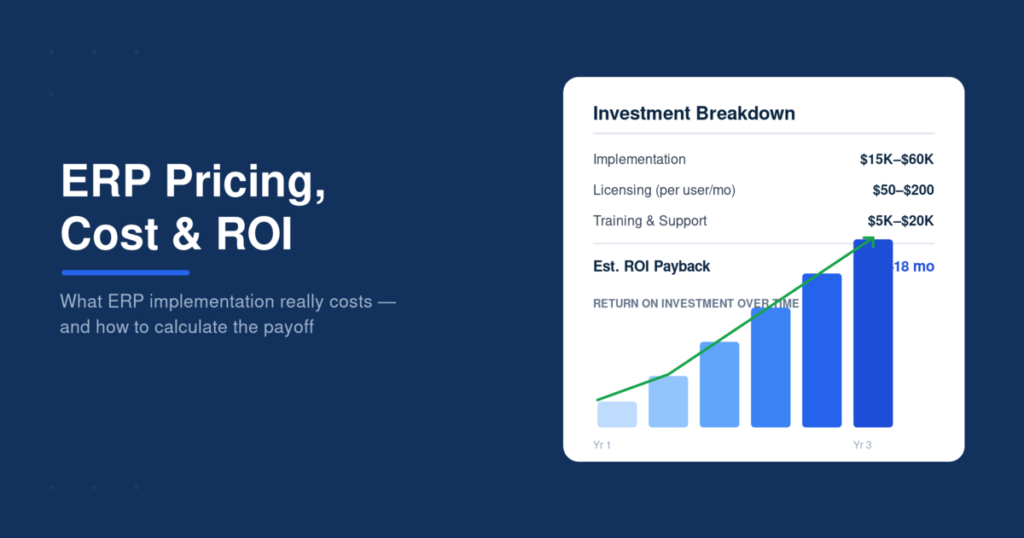
Searching for the best ERP software can feel overwhelming fast — dozens of platforms all claim to be the right fit, and the pricing pages rarely make the differences clear. NetSuite, Odoo, SAP, Zoho, Microsoft Dynamics — each markets itself as the obvious choice, but they’re built for genuinely different situations, budgets, and industries.
This guide cuts through that noise. Instead of a generic feature list, it breaks down what actually matters when comparing ERP software, walks through the strongest options on the market today, and lays out a clear comparison so you can see how they stack up side by side. By the end, you’ll have a shortlist worth evaluating instead of a dozen open browser tabs and no clear direction.
Whether you’re replacing a patchwork of disconnected tools or upgrading from a system you’ve outgrown, the right ERP platform depends less on brand recognition and more on fit — and that’s exactly what the rest of this guide is built to help you figure out.
What to Look for in ERP Software
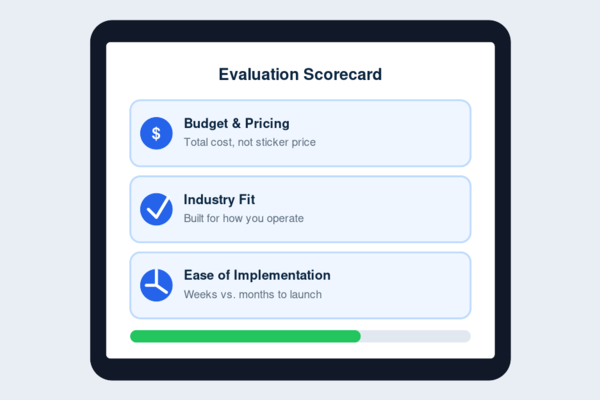
Before comparing specific vendors, it helps to know which criteria actually separate the best ERP software for your business from an expensive mistake.
Budget & Pricing Model
ERP pricing varies widely — some vendors charge per user per month, others price by module, and some require a larger upfront implementation fee on top of the subscription. Before comparing platforms, get a realistic sense of your total cost, not just the advertised starting price, since add-ons and integrations can shift the number considerably once you’re actually using the system.
Industry Fit
Not every ERP platform is built with the same business in mind. Some are optimized for manufacturers with strong inventory and production tools, while others lean toward service-based businesses with stronger project tracking and billing features. A platform that’s highly rated overall can still be a poor fit if it wasn’t designed around how your industry actually operates.
Ease of Implementation
Some ERP systems are ready to use within weeks; others require months of setup, data migration, and staff training before they’re fully operational. Implementation difficulty often correlates with how customizable the platform is — highly flexible systems tend to take longer to configure, while more standardized platforms get you running faster but with less room to adapt later.
Weighing these three factors first makes the vendor comparisons below far easier to evaluate against your actual situation, rather than by reputation alone.
Top ERP Software Picks
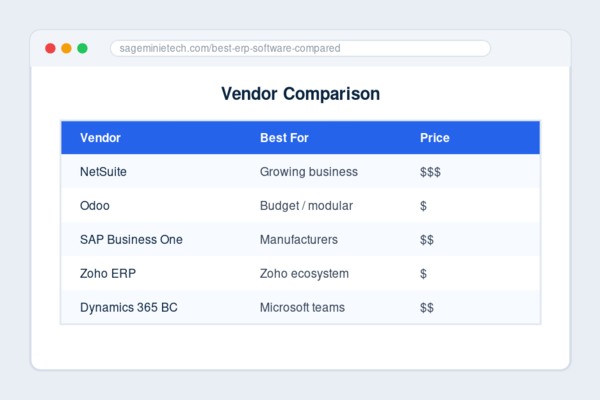
Here’s a closer look at five of the best ERP software platforms available today, and which type of business each one fits best.
NetSuite — Best for Growing Businesses
Oracle NetSuite is one of the most established cloud ERP platforms on the market, and it’s built to scale — from a lean back office to a multi-entity, multi-currency operation. Its strength is breadth: financials, inventory, CRM, and e-commerce all live under one system, with real-time dashboards that give leadership visibility across departments without waiting on manual reports. The tradeoff is cost and complexity — NetSuite is a serious commitment, both in price and in implementation time, making it a better fit for businesses that have outgrown lighter tools and need a platform that can keep pace with continued growth rather than one they’ll need to replace again in a year or two.
Odoo — Best Budget-Friendly, Open-Source Option
Odoo takes a different approach: it’s open-source at its core, with a modular structure that lets businesses start with just the apps they need — accounting, inventory, CRM — and add more later. That flexibility makes it one of the more affordable entry points into real ERP functionality, particularly for businesses that want to avoid paying for modules they won’t use. The open-source foundation also means a large community of developers building integrations and customizations, though businesses without in-house technical support may want to budget for implementation help to get the most out of it.
SAP Business One — Best for Manufacturers
SAP has long been synonymous with enterprise resource planning, and Business One is its offering scaled down for smaller operations without losing the manufacturing-specific depth that made SAP dominant in that space. Production planning, supply chain visibility, and financial controls are all built with manufacturing and distribution workflows specifically in mind, rather than adapted from a generic template. Businesses outside manufacturing may find its feature set more specialized than they need, but for production-heavy operations, that specificity is exactly the point.
Zoho ERP — Best for Teams Already on Zoho
If your business already runs on Zoho’s ecosystem — Zoho CRM, Zoho Books, Zoho Inventory — its ERP offering is a natural extension rather than a separate system to bolt on. The advantage here isn’t necessarily raw feature depth compared to the larger players, but integration: data flows between Zoho’s applications without the friction of connecting entirely separate platforms. For businesses starting fresh, Zoho ERP also tends to sit at a more approachable price point than the legacy enterprise vendors, making it a reasonable entry into unified business software without a steep learning curve.
Microsoft Dynamics 365 Business Central — Best for Microsoft-Based Teams
For businesses already embedded in the Microsoft ecosystem — Excel, Outlook, Teams — Business Central’s biggest advantage is familiarity. Its interface and integrations are built to feel like a natural extension of tools your team already uses daily, which can meaningfully shorten the learning curve compared to platforms built from scratch. It covers the core ERP fundamentals — financials, supply chain, project management — with strong reporting tied directly into Microsoft’s broader productivity suite. It’s a particularly strong fit for businesses that want ERP functionality without asking their team to learn an entirely unfamiliar system on top of everything else.
Quick Comparison Table
For a faster side-by-side view of the best ERP software on the market, here’s how these five platforms stack up on the factors that matter most.
| Vendor | Best For | Price Range | Key Feature |
| NetSuite | Growing, scaling businesses | $$$ | Full breadth across financials, inventory, and CRM |
| Odoo | Budget-conscious, modular needs | $ | Open-source, pay only for the modules you use |
| SAP Business One | Manufacturers & distributors | $$ | Deep production and supply chain tools |
| Zoho ERP | Teams already using Zoho apps | $ | Seamless integration across Zoho’s ecosystem |
| Microsoft Dynamics 365 Business Central | Microsoft-based teams | $$ | Native fit with Excel, Outlook, and Teams |
Price ranges here are relative to each other rather than fixed dollar figures, since actual cost depends heavily on user count, modules selected, and implementation scope — which is exactly what the next section walks through before you commit to a vendor.
How to Choose the Right ERP Vendor
Picking the best ERP software for your business isn’t just about comparing feature lists — it’s about figuring out which vendor will actually hold up once your team depends on it daily.
Questions to Ask Before You Buy
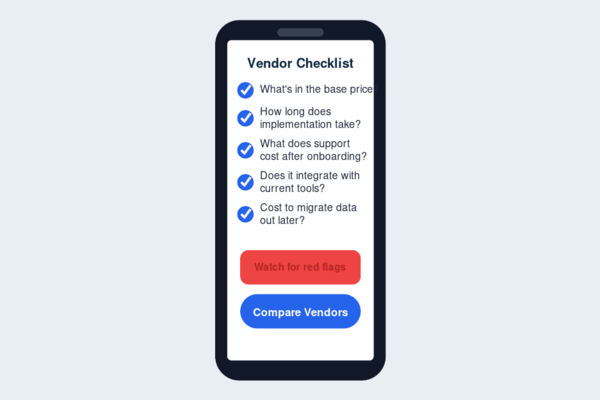
Before signing a contract, get clear answers on a few things vendors don’t always volunteer upfront. What’s included in the base price, and what counts as a paid add-on? How long does implementation typically take for a business your size, and what does that process actually involve? What does ongoing support look like once you’re past onboarding — is it responsive, and is it included, or billed separately? Can the system integrate with the tools you’re already using, or will switching mean replacing more than just your ERP? And critically: what does it cost, and how difficult is it, to migrate your data out if the platform doesn’t work out down the line?
Asking these before you commit avoids the common trap of judging a vendor purely on their sales demo, which is designed to show the system at its best rather than how it performs during your actual day-to-day use.
Red Flags to Watch For
A few warning signs are worth taking seriously during the buying process. Vendors who are vague about total cost, deflecting toward “it depends” without offering a real estimate, often mean the final number will run higher than expected. Pressure to sign quickly, especially with time-limited discounts, is a classic sign of prioritizing the sale over your actual fit. Sparse or hard-to-find customer reviews outside the vendor’s own website deserve a second look, since even niche platforms usually have some visible track record. And a support team that’s hard to reach before you’ve even become a paying customer is a reasonable preview of what support will look like after you are one.
Taking the time to vet a vendor properly upfront is far less costly than discovering these issues after your business already depends on the system.
ERP Selection Case Study
Consider a composite scenario typical of many growing businesses.
The Challenge
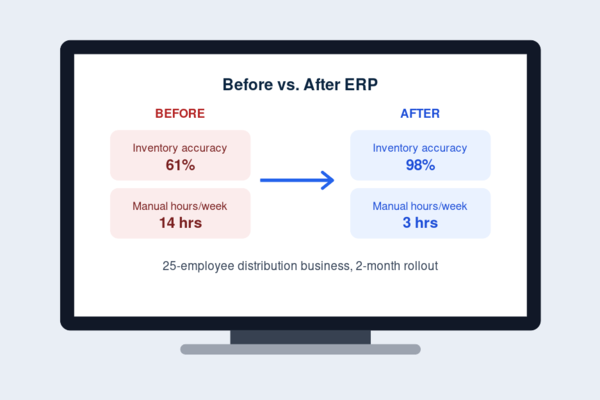
A 25-employee distribution company was running its finances in one accounting tool, inventory in a separate spreadsheet, and customer orders tracked through email and a basic CRM. As order volume grew, the disconnect between these systems started causing real problems: inventory counts drifting out of sync with actual stock, invoices delayed because sales and finance weren’t looking at the same numbers, and leadership making growth decisions on data that was often a week or two out of date.
The Evaluation
The business assessed several ERP platforms using the criteria outlined earlier: budget, industry fit, and implementation timeline. Given the inventory-heavy, distribution-focused operation, a platform with strong supply chain and warehouse features ranked ahead of options built more for service-based businesses. Implementation took roughly two months, including data migration and staff training — longer than the lightest-weight options, but manageable given the scope of what was being consolidated.
The Outcome
The result wasn’t dramatic overnight, but the specific pain points resolved. Inventory counts matched what was actually in the warehouse. Invoicing tied directly to order data instead of requiring manual cross-checks. Leadership could see current performance without waiting on a compiled report.
The bigger shift was in hours saved — administrative work that previously required manually reconciling three separate systems dropped to a fraction of that, freeing staff time for higher-value work instead of data entry. This scenario reflects a common pattern: the value of ERP often shows up less in dramatic transformation and more in the elimination of avoidable manual work.
Common Mistakes When Choosing ERP Software
Even when comparing the best ERP software on paper, businesses often trip up on the same avoidable mistakes.
Choosing Based on Price Alone
The cheapest option often ends up costing more once you factor in missing features, weak support, or a system you outgrow within a year. Cost is a legitimate factor, just not one that should override everything else on its own.
Ignoring Implementation Time
Businesses often budget for the software but not for the weeks or months of setup, migration, and training required to get it running properly — leading to rushed rollouts and frustrated staff.
Overbuying Unnecessary Modules
It’s tempting to buy the full package “just in case,” but paying for HR, e-commerce, or advanced reporting modules you won’t use for years adds cost without adding value.
Skipping Reference Checks
A polished sales demo isn’t the same as real-world performance. Talking to existing customers, especially in your industry, surfaces problems a vendor won’t volunteer.
Underestimating Training Needs
Even the best ERP system fails if staff don’t know how to use it. Underinvesting in training is one of the most common reasons implementations stall or get abandoned.
FAQs
What is the best ERP software overall?
There isn’t a single best option — it depends on your industry, budget, and existing tools. NetSuite suits growing businesses needing broad functionality, Odoo fits tighter budgets, SAP Business One favors manufacturers, and Zoho or Microsoft Dynamics work well if you’re already in those ecosystems.
How much does ERP software typically cost?
Pricing varies widely by vendor, user count, and modules selected. Some platforms price per user monthly, others by module or implementation scope, so the real cost only becomes clear after getting a vendor-specific quote.
Is cloud ERP better than on-premise?
For most businesses, cloud ERP offers lower upfront costs, faster deployment, and easier maintenance. On-premise can still make sense for businesses with specific data control or compliance requirements.
How long does it take to implement ERP software?
Timelines range from a few weeks for lighter, more standardized platforms to several months for highly customized enterprise deployments — implementation complexity usually scales with how much the system needs to be tailored.
Can ERP software integrate with tools I already use?
Most modern ERP platforms support integrations with common accounting, CRM, and e-commerce tools, though the depth of integration varies significantly by vendor and should be confirmed before purchase.
Choosing the best ERP software for your business comes down to matching the platform to your actual operations, not chasing the biggest name on the list. If you’re still deciding whether your business needs one at all, start with our ERP basics guide for a plain-English breakdown of what ERP actually does. And once you’ve narrowed down a vendor, the next real question is cost — our [ERP pricing and ROI guide] walks through what these systems actually cost to implement and how long it typically takes to see a return.